Showing posts with label game design. Show all posts

Monday, June 15, 2015

Design Exchange: Panam Games Mobile Game + Podcasts I Listen to While I Intern

I've been offered an internship position commissioned to work on an HTML5 game based around Design Exchange's Panam exhibit that'll be featured in the Distillery District.
I realize I have a bad habit of not documenting my process work so I thought I'd continue with this work. That, and seeing people put up their school assignments, which I did well in, though with games, I want to work on them more, hell, redo them entirely.
That will be my goal then. Redo my shitty imo assignments.
Here are some of my progression shots of the character I've been working on.

Original character concepts and animation sprites. 
From the various feedback we got from our client, this character won (and shows some obvious inspiration...) and since this exhibition is showcasing sports textiles. The background art (which I'll eventually show...someday..) focuses on cut-out images of Canadian landmarks and Toronto landmarks. I'd like to think it's looking pretty good so far.
Now, onto animation....
I have the opportunity to work with two monitors (a pleasure I do not have at my own place), but while I work I enjoy listening to podcasts (sometimes more than Spotify).
Some of the podcasts I've been listening to while art-ing:

The Truth Podcast
I've been obsessing over this one lately. Since a friend of mine recommended it, I've been hooked by the various stories told, narration, sound effects and the voice actors involved in this production. They last between 10-20 minute on average.

Welcome To The Nightvale
I'd be surprised if you were a Tumblr user and have never heard of this podcast. I usually wouldn't look (or should I say listen) twice when seeing Nightvale on my dashboard, however after an interview with the creator of the show on CBC I wanted to check it out. From what I've heard, it kind of falls flat as it progresses but so far (since I'm only on the forth episode) I've been enjoying it. It's got that old time radio feel (think War of the Worlds) with the kookiness of Supernatural. Maybe that's a terrible example but that + his voice makes me want more.

Serial
Another, and probably the most popular on this list, is This American Life's spin-off series, recommended by a former professor of mine. Season 1 follows the case of Adnaan Sayeed, who was accused and sentenced for life in prison for murdering his ex-girlfriend. The way this is presented and investigated is thrilling to follow and realize how f#$%#$d up the trail was and how its case was handled initially. There are various parodies of this which apparently make fun of the host's and producer's constant self-doubt on whether Sayeed is innocent or not, but I find that it gives more of a human quality to each episode. Season two, which is focusing on an entirely new case/story, is coming out September 2015.

This American Life
The Mecca of podcasts (I kid) that I think(?) is part of NPR (the true Mecca of podcasts, I know). I haven't listened to many episodes from them. This was recommended by a family friend, whom I told to check out Serial (myself not having explored This American Life yet). One episode I recommend is The Ghost of Bobby Dunbar.


The Talk Pit
This is by a friend of mine (& his friends). He is also the one that recommended The Truth podcast to me (shoutout!). Supposedly, they're all on a plane; some are pilots, one's a steward (the guy I know actually), and one's supposedly a father figure.
It's 99% improv (100% just looks off anyway). It's a bit disorganized, but that gives it candidness. The annoying them in my opinion is how it ends abruptly. Sometimes it's due to technical issues. Otherwise, it's hilarious and I catch myself laughing out loud chuckling to myself.

There you have it! I never thought I'd be so sucked into podcasts. The very first one I ever listened to was Pottercast (lol) and later on (and sometimes currently) CBC's podcasts. My favourite ones are The Current, Vinyl Cafe, As It Happens and The Debaters

ETA I used to listen to the Q, but you know, with Jian Ghomeshi & all..

Saturday, May 10, 2014

TO Jam 9 - "After You"

Hurrah! Finals are not only, officially over, but I have done a game jam since my break commenced!

..well, sort of.

This was my first time participating in this year's TO Jam, a game jam local to Toronto that since its establishment in the mid 2000s, it's grown in immense popularity not only amongst local game developers, but has brought game devs from international borders to participate and showcase their game jam games.

Although I'm not the best idea generator (as well as the least convincing when it comes to conveying my ideas) there was a slight stand-still when it came to producing the type of game with this year's game, "After You".

We were excited about implementing a ewe in the game ('cause we're quite punny that way) and despite what felt like coming close to getting the mechanics down and ready to program, design and animate, the gameplay idea was shot down as either something done or something a player can easily break.

It felt a little frustrating going back to square one with our ideas, which in the end, kind of ended in a little split of going with the idea of making a Spore-inspired game (primarily focusing on the beginning of Spore) with the customization of joints and parts to form an evolution.

I myself have only heard and never played the game, so I'm probably not the best person to describe the gameplay except on what I've seen on YouTube,  but I was in charge of creating some characters and sprite sheets with detachable parts.

That day, the pen tool, the paint bucket tool, and layer styles became my best friends for 50-something hours. I went through various processes of character creation, mainly because I was starting with something I would convey as cartoonish creatures but transformed them into ones that represented the Spore style more as well as everyone else's art.

Original Concepts, inspired by characters from shows like Aqua Teen Hunger Force


Updated characters, using various gradients and outer glow effects

In the end, our game wasn't entirely complete but had a basic gameplay where the creature moves around and swallows various NPCs to change its form. The game was developed and programmed using Unity 4.3 (2D)
Prototype of TO Jam Game

For myself, I realized how challenging it was when we all weren't "on board" on an idea unanimously especially when it's a team consisting mostly of artists. Although all of us could have worked on the programming of this ourselves, I felt our biggest setback was not thinking clearly of gameplay first, or having the planning and set-up that we had back in the 2014 Global Game Jam.

On the bright side, some lovely art was produced in the process, and everything looked quite pretty (and hey, great for portfolio work, am I right?)

Overall, it was great playing the various games that many people developed within a short period of time. My favourite games were Malisse by Renaud Betard , XYQ4 by Damian Sommer and Pride and Pistols

Check out all the games (sans this one) from TO Jam 9 here!

People who worked on this TO Jam game with me are: Saffron Aurora, Emma Burkeitt, Jord Farrell and Alanna Predko.

Friday, March 07, 2014

Atelier II Game: Lost in Transit

Alas, the final is completed! The prototype anyways.
The following game will be featured in Level Up! Showcase 2014 on April 4th. Come check out the game and many other games done by my fellow colleagues and various universities.
Click here for the GDD. Click here for Art & Code, Alpha and Beta presentations.

PROJECT TITLE
Lost in Transit 

 PROJECT LOG-LINE
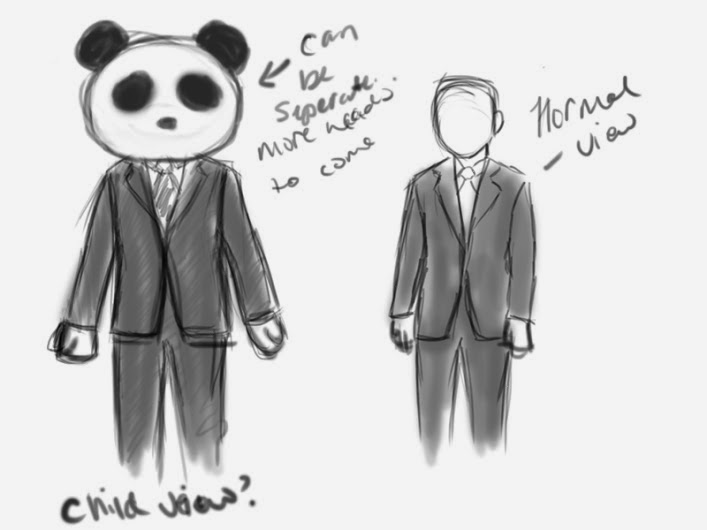
 Amongst the colossal city-scape, the enamoured heights and beauty of the magnificent metropolis distracts you, causing you to lose the one you love most dearly, and traversing analogous paths to reach the apex of the city to find them, before it’s too late. Lost in Transit is a dramatic, panic and sympathy-driven, 3D sandbox-style first person labyrinth where the player controls a parent and a child separately who are stuck in opposite ends of a city and trying to re-unite.
PHOTO DOCUMENTATION: FINISHED PRODUCT


(6TRAILER/VIDEO

PROJECT DESCRIPTION 
The full detailed description of the game can be found on the Game Design Document for Lost in Transit, which is found here.
EXECUTABLE/DOWNLOAD/DISCOVERY PATHWAY 
Alternative: (Dropboxfile)
DEVELOPMENT NOTES & PHOTOS 
Lost in Transit stemmed from Alexandra’s proposal from last semester’s course, Atelier I: Discovery. Alexandra and I (Marishka) both wanted to do a first person 3D game. Alexandra’s proposal was based off a parent and child lost in a city and trying to find each other. The concept was open enough to discover what mechanics we wanted to implement, as well as level design and various other components that bring a game to fruition. One could easily compare this to one of the main plots of Heavy Rain. Furthermore, we did not want to create a super intense-driven game as our main focus demographic were casual gamers and eliminate enemies but rather have obstacles like language barriers or crowded streets (think of the game as the child spawn of Scarlett Johansson in Lost in Translation and Heavy Rain)


It initially commenced as a world, which was very sandbox-based like the GTA series. However, based on time limitation, we decided to create a labyrinth game, where the player would switch back and forth between two characters where on top of their obstacles (NPCs, dizziness, etc.) the player would be in a 1st person perspective, making it more challenging for the player to figure out where they are in the game and reuniting with their second counterpart.
When we placed two FPCs in Unity however, we noticed that both the characters moved at the same time. As we found this challenging, we decided to use this issue and form a sort of 3D version of a former game created by two students called Reflection, where one player controls two characters at the same time. That game was 2D and had a birds-eye view so you knew where both players were going. Our gameplay would involve the player switching back and forth between the parent and child, making it challenging still but luckily have no enemies.

Level Design
We initially designed it considering both characters move at the same time during a labyrinth. From sketching it in a bird’s eye view, I, Marishka, used Chrome Build by Lego to design a 3D sketch-up of the level using digital Lego.
Sh

From there Alexandra created the basic form of the city following the sketch-up, including roads, sidewalks, a skybox and sound.
Sho
However, the challenge came up where the characters could not be controlled in the sense that when one moves south, the other moves north and vice versa. We seemed stuck there as we tried to figure out how to program it correctly. Eventually I programmed it so that the characters don’t move at the same time by hardcoding the controller script instead of using the unity assets. Alexandra programmed the switching between characters. Thus, the game reverted back to its original idea sans Reflection mechanics.
Art, Texture and Music Assets
As explained in the GDD, we created more of a bleak city of sorts, and more or less stressed less on art and more on mechanics.
I programmed the particle effect for the child so no matter where it went, a particle effect would follow. I also created the NPC. Which at first one was more or less a placeholder using Sculptris to model and Photoshop CS6 to texture the model.


Thereon, I wanted to update the model by implementing a walk cycle or a dance of sorts. Rigging the model proved highly difficult when the skeleton would not apply to the mesh. Furthermore, figuring out Blender felt like half the battle when I semi-modeled, rigged, animated and textured solely with Blender. I also created some simple textures for the buildings using Photoshop as well the instructions and title screen. That time my tablet broke which caused major pandemonium to produce a better quality asset for the beta. However, for Level UP!, expect an update on the art assets.

Alexandra created the win/lose states as well as the camera effects for both characters. She implemented the city sounds as well to give it more of am ambient feeling of walking through city streets. Furthermore, she produced the win/lose state and mini maps.
win state (rough)


Playtesting alpha results
It was highly suggested that we added a map to give the player some notion of their location by having a close-up mini-map and a full view mini-map at the bottom of the screen to indicate the player’s location for each character. Another suggestion was having the characters to spawn at different locations each time to increase playability and implement a landmark of sorts to give the player a goal to reach (or in this case, a place that the player needs both characters to reach in order to be reunited).
Alexandra focused on getting both maps with their locations and had it so every time the player switches characters you would see the location of the active character only. At first, the full-view mini map was a greyscale map that showed the outline of the city but it was suggested to add the player’s location to that one too. She implemented a big tower located in the centre of the city as the landmark both players need to get to in order to find each other.
I focused on changing the spawn points for the player so that every time the game restarted, the spawn point would change. By creating an empty game object and instantiating it using the FPC as a prefab that is dragged when the empty game object is instantiated, the spawn location changes. The main issue wit this is that it only worked for one player so we needed to create multiple prefabs for multiple spawn locations for both characters.
Minor changes to the visual effects of players which required some debugging for the cameras but became more effective and showed improvement.
Playtesting beta results
The game plateaued, as it became more of a simulation than an actual game. The mini showing the entire city easily gave the location to the other player so we removed that. The buildings were too tall to locate the landmark so we shortened it and made it so that it would look more iconic and bold and “in-your-face” to the player (similar to Journey). The city would be better detailed which we look more into for future directions. In order to make the game less boring and give more challenge to the player to complete and replay the game (if they lose) by implementing a timer. For visual assets, it was suggested to add specific detail as players would base location on certain buildings (aka implementing more visual cues and clues).
Lastly, we decided to add unique music to each character so that the characters would know they are close to one another when two different tones they emit chime together. Furthermore, if the player goes too far off-course, an irritating sound would play, indicating that the player is too far. 
FUTURE DIRECTIONS 
For the full list of future directions of Lost in Transit, click here (The GDD).
TEAM INFORMATION 
Alexandra Lau & Marishka Zachariah were both involved in creating 3D assets, mechanics, level design and programming. Alexandra composed all the music assets and I was involved with more of the art assets and animation.

Saturday, January 25, 2014

Global Game Jam 2014 {Toronto}: RGBeats!

Alas, the last game jam is finally upon myself. Sure, there's another one by DMG but my mental and physical health calls quits after this one!

UPDATE:
Here's the game, available for download!
Windows
Mac

I was enrolled in a team of 8 called DF: Tidans! The theme this year was "we don't see things as they are, we see things as we are".

The first thought that appeared in my head were people's perceptions on experiences and objects. As a group, we all agreed on using colour to cover the theme and the mechanic, specifically on how being one colour you only see that colour (horrible wording but you see what I mean...I hope).

With that in mind, we focused on producing a platforming game using Unity where the player controls a sprite (a television mascot of sorts) through various coloured platforms to reach the end goal (aka the remote).

The "twist" or mechanic on the game is that the platforms are timed based on colour. When the level loads, the game starts with only the green platforms displayed for instance. Based on the music (specifically the rhythm of the game) the colours of the other platforms will appear but only in that colour. So once the blue platforms appear for instance, the green ones will disappear.

As there were many people in our team, the assets were divided amongst many team members, and one did music and 2 did the level design and programming.

My role was mainly designing the background for the game and creating the goal (the remote).

The team originally had the idea of having a plain black background or something plain and neutral so the colours would be very contrasting. As I had the role of doing the background, I decided to add some detail to the background as I was not entirely sure how all the assets would come together.

Concept art of character controller.


Once we decided on having the TV character (as the colours that change are like the lines on the TV, specifically RGB) I thought of the movie Pleasantville when the black-and-white fictional TV show transitioned into colour (there is much more context to that movie so I'd highly recommend that you check it out! Despite Tobey Maguire...)
I first checked out 50s and 60s themed wallpaper on sites like Pinterest to get some inspiration (at the time I pictured the TV set walking through a 1950s home of sorts).
Upon discussing with other team members, they suggested something more geometric as the art-style would be very simplified aesthetics-wise, and pointed to the direction of something like art deco as an example.
On the first night (Friday night) I focused incessantly on producing an art deco background. Needless to say, as a PhotoShop...well..not sure if novice or just not aware or every single feature available of PhotoShop CS6, but re-creating the art deco was extremely frustrating. It's doable yes, but within a few hours time and it looks aesthetically pleasing? Aw hell no.
Right before I decided to fall asleep (aka 4 in the morning) I decided to Google geometric backgrounds and PhotoShop in the search bar and found some useful tutorials that inspired me to create a geometric background but maintain a grayscale colour scheme so the platforms still stand out due to the contrast.


Using a reference, I decided to do a second background for another level.


Lastly, I did the remote aka end goal using Photoshop.


The most I learned was Layer Styles and shortcuts on combining a bunch of layers into one layer (cooool). Geometry!

So far, the most I can show are Splash Screens and the model (without the rig and animation).
The post will be updated soon...after the JUMP!


On a side note: I *attempted* on a concept level that I thought up of within 10 minute (20? Definitely not that much time ahaha) for the game. It was intended to be difficult but I guess without the controls on the timing etc. it would be hard to tell however, it shows how much you need to playtest!


Sunday, January 19, 2014

The Great Canadian Appathon Game! "Snorewhal"


Hey you! Long time no.. game?


This month I guess I can say is the month of {attempting} to pursue some of my resolutions and in some aspects, I feel I've taken a few years back from leaving these to the wayside.
However, there is always {somehow} some goals achieved, whether it was something you wanted to achieve or did not realize how underrated they are.

Besides finally getting a part-time job (All the better to juggle along with my class schedule! Lovely...) I have been participating in a game jam almost every week. On top of that, I want to study abroad, get an internship, design as many games as possible, keep up my vlog, yadda yadda yadda, the list goes a continuous mile and makes a circular loop that whips my ass for being a failure in life.

This year I decided to partake in The Great Canadian Appathon despite never developing and publishing an app before this.

This years theme was fantasy and our team decided to go for a game that did not focus on the typical cliché side of fantasy (e.g. Legend of Zelda). Upon a member mentioning "narwhal" and another member wanting to focus on the aspects of dreams we combined the idea of a narwhal traversing through his dream.

We decided to use the mechanic of a phone's accelerometer to control the movement of whale, which would be played  as a third-person adventure obstacle course. The objective was to reach the end of the level but keep yourself afloat by collecting balloons to sustain yourself. If you do not collect enough balloons, you will start falling and once you reach the ground it's game over. Furthermore, you must avoid the sea urchins as you go through the course.

The role I had was designing the narwhal. I used a variety of software to sculpt and animate the narwhal. I used Sculptris to build the mesh and exported the file as an obj to be rigged and animated in Blender.

Making Mesh in Sculptris and using a reference via Google Images.


Designing and animating weren't too bad by following a reference , a Blender rigging tutorial and an Blender animating tutorial that can be exported to Unity.

Example of rigging and animating in its idle state.


The main issue I came across was texturing the animated narwhal. As an obj file, it is easy to add a texture on the narwhal OBJ file on Photoshop CS6 but it was not animated.


When finishing painting the model in Photoshop CS6, it exports as a texture file which can be dragged onto the model via Unity. This only works with .obj files.


When googling the alternatives to solve the issue, I decided to attempt unwrapping my model via Blender. That proved to be a chaotic process as modelling in Sculptris (depending on what you are modelling) uses a lot of polygons that can be hard to control and reduce as well as it was not symmetrical to marking the seams to unwrap (or creating one long seam) did not work properly.

A possible alternative to this solution was creating multiple seams for the model (as someone did with a tree) but that seemed too time consuming and also made me realize I am not at an expert level when it comes to unwrapping unless it was a super basic mesh.

The way I somehow solved this is by texturing within Unity. I imported the animated narwhal file (.fbx) and added a more cell shaded texture and .jpg texture onto the whale which worked to some extent. It was hard to tell until I added various lighting on to the Unity scene.

The biggest improvements and changes I'd make is creating everything in one piece of software instead of transferring it to various pieces of software to do various tasks for a mesh. I am looking into more Blender and Maya for this.

More will be added as the appathon is not technically finished.

Update: THIS GAME WAS ADDED TO THE GREAT CANADIAN APPATHON'S TOP 25 LIST OUT OF 100 AND SOME GAMES THAT WERE SUBMITTED!

Friday, November 22, 2013

Game: To Where I Belong (Link)

Clicky!

Sunday, November 17, 2013

Dames Making Games (DMG) NO 2 Jam! : Kill Marry Fuck

The following screen video thingy majigy is the game created by Kate Ballinger, Grace Zhu, and Marishka Zachariah for the 2nd DMG game!

This was our very first game jam and altogether it has been a very interesting and fulfilling experience.

I usually participate in a form of "game jam" on a weekly basis, however this felt much more of a "jam" because it was (practically) 2-3 days to have a completed game, especially because this is the first time working with people I don't know/know very well.

The following game is titled, Kill Fuck Marry.

Background Information
For this particular game jam, we were required  to use "Video Video" aka BentoDojo,  a video software which would produce two outputs: a client and a control. The client was a screen that would be viewed through a projector or laptop/static screen or sorts and the control was a window that the use would interact with (e.g. iPad, laptop, smartphone).

Inspiration

Following the workshop a week ago, our idea for the game first stemmed from the fact of creepy guys and their existence, particularly in certain situations like walking late at night, going to a bar, etc.
We also thought about the game, Kill Marry Fuck where there are three people you choose from where one person decides out of those three, who they will marry, fuck and kill.
Mechanics-wise, we were inspired by YouTube videos that used "annotations" to form a point-and-click adventure game, games like Oregon Trail where actions typed/chosen would ensue an action.

For myself, I was inspired by two games in particular: the games by ZapDramatic, where the user is put into situations, particularly as a negotiator of sorts to get through a situation alive or have a win-state, and Depression Quest, a read-and-click game where you are placed in the position of a person undergoing depression, and through a series of situations, you make certain choices which alters the situation and determines the outcome of whether you get out of your depression or not.
What I liked a lot about that game in particular is how depending on what you choose, there are some choices that are crossed out, showing that in that state, you  may choose it as a player but you wouldn't choose it as a character.

Some more relatable games to that would be the Mass Effect series.

Development

As a group, we briefly discussed on the day of the workshop, a few hours in the middle of the week and finally during the jam.
With the time constraint, we thought of having three situations where you meet three guys and in the end you decide who you'll kill, marry or fuck. There would be six endings in total (2 for each guy where 1 would be good, and the other would be bad). The following situations would be realistic ones which girls have (probably) have come across in terms of meeting guys.
Each of us decided to do 1 situation/1 scene. We decided to animate it instead of filming it as we didn't want to use real people and show "this is a face of a creep". We also stuck to few variables because (a) it would be convoluted and (b) NOT ENOUGH TIME!!

We first fleshed out our scripts and decided who would be faceable, who you would marry and you you'd kill. I worked on the guy you would kill, you would a student attending a lecture of yours at university. Fleshing out a script wasn't too bad.

Next was animating and implementing! Animating wasn't too bad as we stuck with simple motions consisting of 3-4 frames.
The biggest challenge was implementing it into the software, getting to know the software, and going through various steps to execute it (animate in photoshop, render in photoshop, convert it to WEBM format, upload the following to dropbox, and FINALLY copying the dropbox links via the public folder and applying it the the BentoDojo).


Reflection/Challenges

Time management was a lesson I definitely learned in my first game jam! During the week, I honestly had no time to be involved in this because I had another game to complete. I managed to get the script done though! Saturday and Sunday I wish I had timed myself better plan what to do since I unfortunately didn't complete my scene. With more time, we would implement more endings besides a good one as well as music/voice acting for all scenes.
People's reaction were mixed, mostly because no one was satisfied with marrying or fucking either guy based on what they saw. However, one "dame" pointed out, is how it shows how some girls feel so limited with the guys they have "marry /fuck" and acts as a form of satire.

 BentoDojo was...interesting to work with. We weren't allowed to edit at the same time. It wasn't compatible with a lot of software and therefore a convoluted process to go through to make it compatible and finally having to upload every thumbnail and not deleting a room was a pain in the arse but nonetheless..this is great for prototyping!
It was interested working with software that wasn't "game-ey" and non-programmable. It was an interesting challenge to work with however offending the girl who designed this as this is something that frustrated me software/game design -wise made me feel guilty.

That's it for the game jam! It's been a wonderful experience meeting people and working with new software and learning new things! :)


Thursday, October 10, 2013

Atelier Challenge 5: Coffer Chase

Atelier Challenge 5: Coffer Chase
The following project/game is called Coffer Chase

The following people who created this game are:
Ton Candido and Marishka Zachariah

Project Logline:

Player must retrieve the "coffer" full of treasure located in the depths of Coffer Cove Island and escape the island fast as possible once the player gets the treasure.

Update: here's a video on the gameplay and complete setup.

https://www.facebook.com/photo.php?v=10151728281777947&l=5161652017598890043


Project Description:

The following project is an experimental game involving a webcam, a projector, opaque liquid (milk), interactivity of objects and people, and a Processing GUI that recognizes a colourful tracker.
The player controls a token, which is read as a ship on the processing GUI. The player can view both token and the layout of the game on the dish.
The player maneuvers the token by blowing on the token to advance the token. The player must control their breath in order to control the distance the boat goes. Each level is a labyrinth the player must advance through.  If the player loses all four lives, it's game over.

There are various items within the game that affect the gameplay:

Door:
Doors guard the entrance to the next level. They can only be unlocked with a key.

Key:
The boat must find the key to unlock the door.

Rum Barrel:
This is a power-up where the player gains an extra life.

Coffer:
The coffer or chest, is the player's objective, as the player must reach the coffer to advance the next level.

Mace:
This is an object the player's ship must avoid while maneuvering through the level. If the boat hits the mace, they lose a life.

The last level is timed so not only must the player must retrieve the key to unlock the escape route, avoid hitting walls and the mace, but get out of the level as fast as possible.
Based on the cards we chose, the pirate/island/searching-for-treasure seemed most fitting, especially for a one-player type of game. Limitations on symbols also gave us some limitations on ideas (at first) but found that the set of cards that we finalized on made it easier to go with a ship-wrecked and search for treasure type of game.

 Intended audience: people who love interactive games that may have a similar concept to a game like Space Invaders but involves mechanics that keeps them active and gain a different experience with different controls.

Games with devices and peripherals like Kinect allow players to be more engaging not just with their game, but their environment. They not only develop increased dexterity but also increased awareness of their interaction with an object in real life that effects the game in real time


Exectutable/Download/Discovery Pathway:
There is no downloadable file: however, we the code used in Processing.

The following are Tom's notes:
On this game we used color tracking with Processing and a Web Cam. The basic principle is that Processing analyzes each pixel of the image of the camera and sees which ones have a color that matches the pre selected color. After that, the software tracks the color and projects the boat on the spot with that color.

In order to get the better contrast, we used a bright fluorescent pink color and had the software iGlasses to intensify the color, making the tracking more stable.

Part of the tracking code:

void Tracking () {
  // Before we begin searching, the "world record" for closest color is set to a high number that is easy for the first pixel to beat.
  float worldRecord = 500; 

  // Begin loop to walk through every pixel
  for (int x = 0; x < cam.width; x ++ ) {
    for (int y = 0; y < cam.height; y ++ ) {
      int loc = x + y*cam.width;
      // What is current color
      color currentColor = cam.pixels[loc];
      float r1 = red(currentColor);
      float g1 = green(currentColor);
      float b1 = blue(currentColor);
      float r2 = red(trackColor);
      float g2 = green(trackColor);
      float b2 = blue(trackColor);

      // Using euclidean distance to compare colors
      float d = dist(r1, g1, b1, r2, g2, b2); // We are using the dist( ) function to compare the current color with the color we are tracking.
      // If current color is more similar to tracked color than
      // closest color, save current location and current difference
      if (d < worldRecord) {
        worldRecord = d;
        closestX = x;
        closestY = y;
      }
    }
  }


----

In order to have a maze, we used a Collision Map image that prevent the boat from getting out of the path. The collision map image is a blck and white file, in which the white color is the path and the black color is the place where the boat can't go.
Processing analyzes the pixels of the map and keep the boat in the maze.

  color black = color(0);
  color white = color(255);

  // go through each row in our collision map image
  for (int i = 0; i < colMapImage.width; i++) {
    // go through each column in our collision map image
    for (int j = 0; j < colMapImage.height; j++) {

      // get the color value of the pixel at our current position
      color c = colMapImage.get(i, j);
      // if the pixel is black
      if (c == black) {
        // we can't go there
        collisionMap[i][j] = false;
      } 
      // if it is white
      else if (c == white) {
        // it's good to go
        collisionMap[i][j] = true;
      }


Both of the codes were founds at learningprocessing.com/ and the porcessing reference forum.

Development Notes:/Troubles
Ton and I were inspired by games that have been developed using an AR like Kinect. A good example of our inspiration is this game: http://www.youtube.com/watch?v=OaF44HcABkI
We were inspired by the dynamic of a player playing a game with water. None of us had a Kinect (nor did we want to fish out money for one) and decided to take similar mechanics from Ton’s solo game challenge using a projector, webcam, tracker and a dish full of water.
After some thought (and based on the fact that we had to stick to one symbol) we used the following cards:

Experimental Game
About Time
Involving Navigating
Regarding sustainability
Involving treasure
Involving a projector (wild card)

Using these cards, we formed out game into a labyrinth-like game where the player tries to collect the treasure but must escape the island once it receives the treasure before it’s too late.
It was simple enough to come up with an objective using an object that the processing GUI would track, but the main challenge was how to implement the most important mechanic in the game: moving the actual token/tracker in liquid.

At first we came up with the idea of moving the token with our hands. However, it seemed it would make the game too easy and tried to think of a better challenge.
Using a fan or something to create wind for the token to move came up, but thought it would cause too many ripples in the water and kept that aside for now.
Another obstacle that came up was the liquid to use in the game. The inspirational video used bath salts so we tried a bath bomb/bath ballistic at Lush. However, it did not produce the opacity required to view the game on a liquid surface.
The best solution was opting for milk, as it had the most opaque white surface that would project well.
To give more substance to this searching game, we considered many challenges:
We thought of sustaining the game during the game by having it so that it may sink in a matter of seconds/minutes and had to get it to the end of the level before it sinks. The player had three tries to salvage it but once it was used up, that was it. This mechanic was scrapped due to getting a little complicated.
We thought of using coins and have it so that the player can achieve a high score or complete a percentage of the game based on the amount of coins collected throughout all levels. We scrapped this in the end because based on timing; it was too much to add on top of coding a tracker.
We thought of having it challenging for players that if the token hit a wall, they lose a life and the level restarted. However, this also proved too much to code.
We finalized the mechanics to finding a key in the level that unlocks a door to the next level, having moving maces as an obstacle to avoid, and having a countdown timer at the last level when the player must “escape” the island.
Ton programmed the game and Marishka designed the levels and did most of the design work.
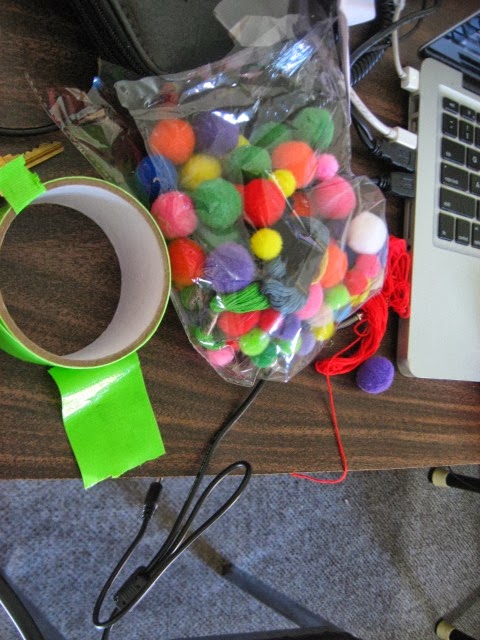
Programming-wise, the big challenge was getting a portable webcam calibrated enough to recognize the tracker. We experimented with various materials (pom-poms, film storage container) and found the best tracker was a black Bristol board with red string attached, as it was the most recognizable and the easiest to manoeuvre.

Design-wise, we first used illustrator to outline the levels. Marishka outlined where items should be place in the level (e.g. the door, the key, etc.). Both Illustrator and Photoshop were used to create the objects and levels for the game. We had to make sure that the levels and objects had no red colour in them or else the GUI would red more than just the tracker and would mess up the gameplay.
We started by making the pathway white to provide better contrast but opted for blue as the boat/token “sails” through its course/quest.

For the title of our game, we googled pirate glossary and discovered that Coffer meant a chest containing treasure. We went with Coffer Chase as alliteration tends to work well with titles as well as suited the context of our game.

For music, we used island-reggae type music to set a tone for the game. http://www.youtube.com/watch?v=AXx6hIZmgy4

Setting up the game was interesting as well. We used a shallow 28 × 45 cm dish and filled it halfway with milk. Using a clothes hanger, we placed the dish at the bottom and attached the projector and webcam* with tape. Their lens facing directly below the dish
*due to the poor webcam quality, we have used a laptop as well however it can be risky. The laptop running the GUI is nearby as everything is connected to the laptop.

Overall, the final product worked very well. The levels were clearly shown, and the tracker worked. Furthermore, the mechanic of  the player using their breath to move the token worked very well (Marishka and Ton play-tested this with a food container and there were barely any ripples).

Testing calibrating using another file
Materials used to set up the game. Pom-poms and string were tested as potential trackers.
Example of outline of a level indicating where objects were placed, the start and end of the level. This is level two of the game.
How we intended to set up the projector and dish.
original notes outlining a maze, and equipment required for game
this was one of our old ideas where the tracker/token eventually sinks over time and player is required to sustain it throughout the game.
Design notes for levels and objects used to advance level (e.g. key)
first level
second level
3rd level layout
placeholder for objects. At the time, we were still considering having coins in the game
designing the key in Photoshop CS6.


Future Directions:
Use a different liquid that won’t expire/go bad easily. We only experimented with one type of bath salt, so doing trial-and-error to see which bath salts produce the whitest consistency would cease us from wasting nutritional food.
It would also be interesting to include the mechanic /challenge of the token losing health/lives if it hits the wall. This will help players strategize their breadth control or at least be more pressured in doing so.
Having a high score factor would be nice especially if the game was presented professionally and make people more competitive with others and themselves by either collecting lots of coins or beating their escape time.
Use dramatic music when the timer starts.

Finally, using a Kinect would product much more of a variety of mechanics for players to use. For instance, we could introduce NPCs that players can kill by using their hands to form a “power up charge” and direct it at their target (see inspiration video above).